

doximityask
May 20, 2026
How to Get Better Answers from AI: A Prompt Guide for Oncologists

# Oncology
# Prompts
A few small changes to how you phrase your questions in Doximity Ask's AI can make a big difference in the quality of answers you get back.
Like any clinical tool, Doximity Ask works best when you know how to use it well. The difference between a vague query and a well-framed prompt can be meaningful, a generic answer versus one that’s directly useful for the patient in front of you.
One thing that makes Doximity Ask different from general AI tools: it’s HIPAA-compliant. That means you can include actual patient context in your prompts, specific diagnoses, lab values, treatment history, without the concern you’d have using a non-healthcare AI tool. The tips below take advantage of that.
# | Rule | The idea |
|---|---|---|
1 | Add patient context | Specific beats generic. Include cancer type, prior treatments, and relevant labs. |
2 | Specify your output format | Tell it what you want back: bullets, a note, a differential, a paragraph. |
3 | Use it like a colleague | Ask reasoning questions, not just lookup questions. |
4 | Paste the actual clinical data | Upload the path report or imaging impression instead of de |
Here are five things that tend to make a real difference.
1. Add patient context
Doximity Ask responds to what you give it. A bare drug name returns general information. The same drug name paired with your patient’s cancer type, prior treatments, and relevant labs tends to return something much more actionable. Because Doximity Ask is HIPAA-compliant, you can include that clinical detail without worrying about sharing patient information in a non-secure environment.
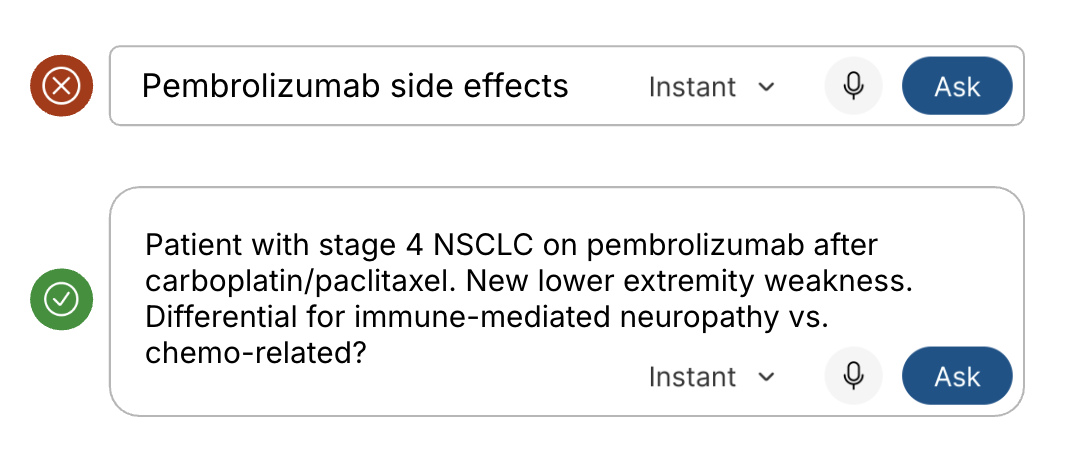
Instead of: “Pembrolizumab side effects”
Try: “Patient with stage 4 NSCLC on pembrolizumab after carboplatin/paclitaxel. New lower extremity weakness. Differential for immune-mediated neuropathy vs. chemo-related?”
2. Specify the output format you want
Doximity Ask’s AI can return a differential, a treatment plan, a patient-facing explanation, a clinical note, or a summary paragraph. It helps to ask for the format you actually need rather than leaving it open-ended.
Instead of: “Neoadjuvant vs adjuvant for breast cancer”
Try: “Give me a brief summary of neoadjuvant vs adjuvant sequencing for HER2-positive breast cancer. Bullet points, clinical decision focus.”

3. Use it like a colleague, not a search engine
Doximity Ask handles conversational, reasoning-style questions better than most people expect. You can ask it to think through a case, weigh options, or explain its reasoning, the same way you might talk through a tricky patient with a colleague.
Instead of: “THP chemo”
Try: “My patient is on THP. She’s now falling at home. Could the taxane or the pertuzumab be contributing, and what would I monitor?”
4. Paste the actual clinical data
For lab interpretation, imaging impressions, and pathology results, pasting the actual data tends to work better than describing it. Doximity Ask’s AI can read a CT impression, a PET summary, or a full lab panel and respond to the specific values and findings.
Because Doximity Ask is HIPAA-compliant, you can paste real clinical documents, upload path reports, or include imaging impressions without concern. That’s the kind of input that leads to the most useful AI output, and it’s not something you’d want to do in a non-compliant tool.
Instead of: “What stage is this pancreatic cancer?”
Try: Paste the full IMPRESSION section from the radiology report, then ask: “What stage does this suggest and what are the key findings driving that?”
5. Follow up and refine
You don’t have to get everything in one prompt. Doximity Ask maintains context within a conversation, so if the first answer isn’t quite what you needed, just ask again with more specifics.
Start with: “Draft a progress note for this patient” (with attached records)
Then follow up: “Rewrite the A&P in paragraph form, no bullets, combine assessment and plan.”
This kind of back-and-forth tends to produce better output than trying to write the perfect prompt on the first try.
The short version
Think of Doximity Ask the way you’d think about asking a knowledgeable colleague: share who the patient is, what you already know, and what you actually need. The more clinical context you give it, the more useful the answer tends to be. And because it’s HIPAA-compliant, you can share that context without hesitation.
Dive in
Related
Education
How Oncologists Use AI to Manage Immunotherapy Toxicity
By Doximity Team • May 20th, 2026 • Views 36
Education
How Oncologists Use AI to Think Through Treatment Decisions in Real Time
By Doximity Team • May 20th, 2026 • Views 18
Education
How Oncologists Use AI to Draft Clinical Notes Faster
By Doximity Team • May 20th, 2026 • Views 20
Education
How Oncologists Use AI to Manage Immunotherapy Toxicity
By Doximity Team • May 20th, 2026 • Views 36
Education
How Oncologists Use AI to Draft Clinical Notes Faster
By Doximity Team • May 20th, 2026 • Views 20
Education
How Oncologists Use AI to Think Through Treatment Decisions in Real Time
By Doximity Team • May 20th, 2026 • Views 18